Disclosure: This is a blog about how to make money blogging, and where we recommend affiliate programs for bloggers. As such, this post may contain affiliate links, which means we may receive a commission if you click a link and purchase something that we have recommended. As an Amazon Associate I earn from qualifying purchases. Please check out our disclosure policy for more details.
eBay has long had an affiliate program, eBay Partner Network, but it’s one of the most difficult affiliate networks to understand. I have used it and I have made money from it, but I’ve never once had any of the reports work. If I look now it literally says I’ve never sold anything, despite the occasional deposit they make into my bank account. While lots of people love shopping eBay, it has been hard for me to recommend this as a good affiliate network to join because it’s just so confusing. Luckily, Izea, the influencer network, has made it a lot easier to showcase your favorite eBay items on your blog! Izea SocialLinks just launched, which allows you to grab the links for items that are on sale at eBay and then easily post them to your blog or social media outlets!
Getting started with Izea SocialLinks is easy! First things first though, if you don’t yet have an Izea account, click here to register for one now! Izea is primarily an influencer network, and what this means is that you can attach your social media networks and blog to your account and they’ll let you know if they have any sponsored posts/tweets/instagram photos/etc. that might be a good fit for you! Note: There’s a free version of Izea and there’s a paid version. I’m currently paying $1 per month for my account, but many people stick with the free one! I pay the $1 in hopes that it will give me access to better opportunities… but I’m honestly not sure that it has.
How to Use Izea SocialLinks
Once you have your Izea account set up, or once you log in, look to the lefthand menu bar where you should now see a “SocialLinks” tab.

From there you can search for anything on eBay. For instance, I just did a search for “Vera Bradley weekender” and got a bunch of results.
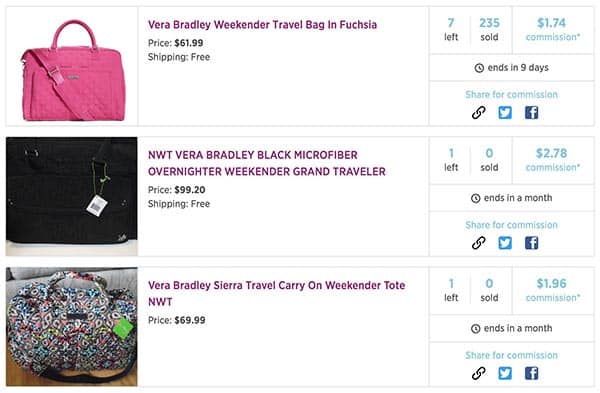
There are a few key things to note. The first bag, the pink one, appears to be sold by an eBay store, as there are 7 total bags available. The other two are likely from individual sellers. Each individual item tells you the approximate commission amount you will make if your link leads to a sale, which is awesome! Additionally, the interface tells you if shipping is free and when the auction ends.
To get your link, just click on the “link” icon in the “Share for Commission” box. You can also share a link to the item on Twitter, or post about it on Facebook!
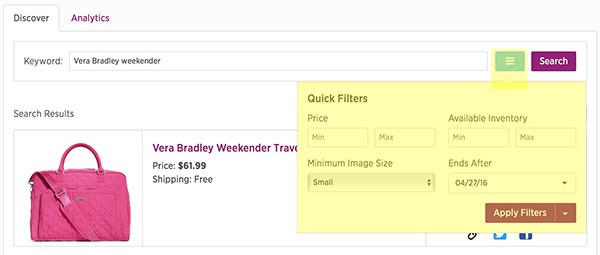
If you want to fine tune your search results, just click on the blue box next to the search box. You’ll be able to set price filters, inventory filters, and image size. When your results appear you can also sort items by filters like “newly listed,” “ending soonest,” etc.
The only thing I don’t currently like about this interface is that if you want to post about these items on your blog you need to click through the URL in the title to grab an image. This is a little confusing since you can set an image size in the filters, so hopefully this is just something they overlooked. (I tried saving the image on the page but it won’t let me.) Hopefully they fix this in the future to provide a direct image link! If you post on Facebook an image automatically populates.
Overall
I honestly think this is a great tool if you ever have a reason to post about eBay items on your blog as this interface is SO much easier to navigate than on the eBay Partner Network! If you want to quickly and easily share items from eBay on your blog or social media accounts, I highly recommend checking out Izea SocialLinks!